Delta Lake: transactions, MERGE & maintenance
How an ordered log turns immutable Parquet files into a table, and what MERGE, OPTIMIZE, and VACUUM really cost.
A Delta table is a set of immutable Parquet files plus an ordered log that says which files make up each version. Transactions, MERGE, time travel, and VACUUM are all changes to that file list, and every cost is a file rewritten or a file retained.
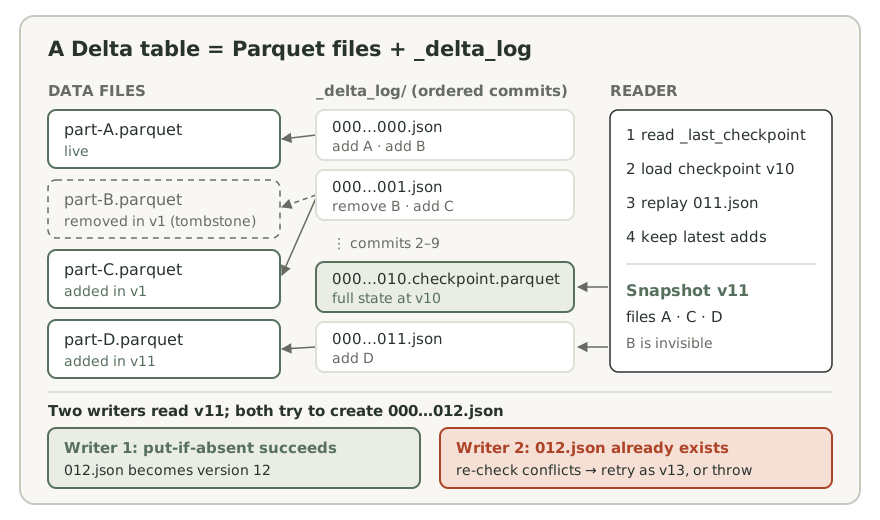
The transaction log is the table
A Delta table is a directory of ordinary Parquet files, so everything in the storage-formats lesson still applies, plus a _delta_log/ directory that decides which of those files the table contains. Each commit is one file named by its zero-padded version (00000000000000000000.json, 00000000000000000001.json, and so on) holding newline-delimited JSON actions:
- add: a data file joins the table, with its size, partition values, and per-file statistics (row count, min, max, null count).
- remove: a file leaves the table. It is a tombstone with a deletion timestamp; the Parquet file stays on disk.
- metaData and protocol: schema, partition columns, table properties, and the reader and writer features a client must support.
- commitInfo: the operation, its parameters, the version it read, and its metrics. This is what
DESCRIBE HISTORYshows.
Delta never edits a Parquet file. In the local run, deleting one row produced commit 1 with a remove for the four-row file and an add for a three-row replacement (numCopiedRows 3). A row-level change is a file swap in the log.
A reader builds a snapshot: it follows the _last_checkpoint pointer to the newest checkpoint, loads that Parquet file of replayed state, replays the JSON commits after it in version order, and keeps each file whose latest action is an add. Delta 3.2.1 writes a checkpoint every 10 commits by default (delta.checkpointInterval); the run's eleventh commit produced 00000000000000000010.checkpoint.parquet, holding 11 live add rows plus the unexpired remove tombstone. The file list comes from the log rather than from listing data directories, and a query reads one version from start to finish.
Check the sources: Delta protocol · Delta 3.2.1 table property defaults
Commits: optimistic concurrency and the storage underneath
Writers take no locks. A transaction reads a snapshot, writes new Parquet files that no reader can see yet, then validates and commits by creating the next log file. If another writer created that version first, the transaction checks the commits it missed against what it read and changed. With no conflict, it commits at the next free version; with a conflict, it fails. Per the Delta 3.2.1 docs, blind INSERTs cannot conflict with each other or with compaction; UPDATE, DELETE, and MERGE can conflict with every operation type; compaction can conflict with those and with other compaction.
| Concurrent pair | Observed |
|---|---|
| INSERT + INSERT (blind appends), three rounds | Both committed every round; history shows each pair with the same readVersion |
| UPDATE + DELETE | UPDATE committed; DELETE failed with ConcurrentAppendException |
| UPDATE + INSERT … SELECT from the same table | INSERT committed; UPDATE failed with ConcurrentAppendException |
The message was [DELTA_CONCURRENT_APPEND] ConcurrentAppendException: Files were added to the root of the table by a concurrent update. Please try the operation again. The table was unpartitioned, so the loser's read covered every file and the winner's rewritten file counted as a concurrent append. Partitioning by the column both jobs filter on, and putting that predicate explicitly in each condition, keeps their file sets disjoint. The other conflict types are ConcurrentDeleteReadException (a file you read was removed), ConcurrentDeleteDeleteException (you both removed a file), MetadataChangedException, ProtocolChangedException, and ConcurrentTransactionException (two streaming queries sharing a checkpoint).
"Commits by atomically creating the next log file" is only as atomic as the storage. Delta requires atomic visibility, mutual exclusion (only one writer can create a given file), and consistent listing. The Delta 3.2.1 docs say HDFS and Azure storage give full guarantees for concurrent writers from multiple clusters, and GCS needs the correct LogStore configured. For S3, the docs state that S3 does not provide mutual exclusion and that concurrent writes from multiple Spark drivers can lead to data loss. Writes must come from a single driver, or every writer must use the experimental DynamoDB-backed io.delta.storage.S3DynamoDBLogStore. The log defines the transaction; the storage system decides whether the commit is truly exclusive.
Check the sources: Delta concurrency control · Delta storage configuration · Delta protocol
MERGE: where the cost actually is
In Delta 3.2.1 a MERGE with matched clauses runs in three phases. First, an inner join of source and target on the merge condition finds the touched files, the target files holding at least one match, and checks that no target row matches two source rows. Second, it reads the touched files again and joins them with the source, writing updated rows, inserted rows, and every unmodified row in those files. Third, one commit removes the touched files and adds the new ones. Insert-only merges take a separate single-job path.
The draft's "two passes" is right about scanning the target twice, but the cost driver is rewrite volume: one match in a 1 GiB file rewrites the whole file. On a 100-row table in four 25-row files, one MERGE of five source rows (three matches in three different files, two inserts) reported:
| Metric | Default (rewrite files) | delta.enableDeletionVectors = true |
|---|---|---|
| numTargetFilesRemoved | 3 | 0 |
| numTargetFilesAdded | 1 | 2 |
| numTargetRowsUpdated | 3 | 3 |
| numTargetRowsInserted | 2 | 2 |
| numTargetRowsCopied | 72 | 0 |
| numTargetDeletionVectorsAdded | 0 | 3 |
| numOutputRows | 77 | 5 |
With deletion vectors, phase two writes only the changed rows. The touched files stay, re-added in the log with a deletionVector descriptor that marks their old rows as deleted. The trade-offs are real. Enabling the property upgraded the table to reader version 3 and writer version 7 with the deletionVectors feature, so clients without support can no longer read it. Readers also filter marked rows until OPTIMIZE or REORG TABLE … APPLY (PURGE) rewrites the files. The property defaults to false in Delta 3.2.1.
To shrink both phases, put a partition predicate in the ON condition so fewer files can match, keep files compacted and clustered on the merge key so matches land in few files, and size spark.sql.shuffle.partitions for the join. Deduplicate the source by key first: that is a correctness requirement, not a tuning option. (Databricks' "low shuffle merge" is a vendor-specific optimization, not part of OSS Delta 3.2.1.)
Check the sources: MergeIntoCommand phases · ClassicMergeExecutor · Delta MERGE tuning · Deletion vectors · Property defaults
Layout: statistics, partitioning, Z-order, and OPTIMIZE
Delta moves the file-skipping index into the log: every add carries min, max, and null counts, and a filter is checked against them before any data file is opened. Statistics cover the first 32 columns by default (delta.dataSkippingNumIndexedCols). A 34-column table in the run recorded statistics for c00 through c31 only, so a filter on a later column gets no file skipping unless you reorder columns or raise the setting.
Partitioning splits the table into directories by value. A filter on the partition column removes whole partitions from the file list, and partition predicates also keep concurrent writers apart. It suits low-cardinality columns that almost every query, DELETE, and MERGE filters on, such as a date. On a high-cardinality column it yields a flood of small files. Z-ordering (OPTIMIZE … ZORDER BY) instead rewrites files so rows with nearby values share files, narrowing each file's min/max range so statistics can skip on high-cardinality columns. It only helps columns with statistics, its locality weakens with each extra column, and it is not idempotent: each run re-clusters the files it considers, so bound it with WHERE on partition columns.
| Layout | Files in table | Files read for user_id BETWEEN 100 AND 120 |
|---|---|---|
| Never optimized | 40 | 40 |
OPTIMIZE (bin-packing) | 8 | 8 |
OPTIMIZE ZORDER BY (user_id) | 7 | 1 |
Files read is the scan node's number of files read metric, and it matched a count of files whose logged min/max overlapped the range. Compaction alone fixed the file count but not the skipping; clustering fixed both. With the default target size (spark.databricks.delta.optimize.maxFileSize, 1 GiB), OPTIMIZE turned 40 files into 1, and a second run removed and added nothing. Compaction is idempotent, and readers on older snapshots keep reading the old files, which stay on disk until VACUUM. Delta 3.1 and later also offer optimized writes and auto compaction to create fewer small files in the first place; optimized writes are off by default.
Check the sources: Delta optimizations · Delta table properties · OPTIMIZE file size configuration · Spark file partition sizing
VACUUM, time travel, and RESTORE
VACUUM is what deletes data files; Delta never deletes them automatically. It removes files the current table version no longer references once they are older than the retention threshold, 7 days by default (delta.deletedFileRetentionDuration). The draft's "removes unreferenced files past retention" is close but loose: a file the latest version dropped an hour ago is unreferenced and still kept, because a version inside the window needs it. Log files are a separate clock: they are cleaned up after checkpoints once older than delta.logRetentionDuration (30 days by default).
That retention window is your time-travel and recovery window. Reading a version (versionAsOf, timestampAsOf, VERSION AS OF) needs both its log entries and its data files. VACUUM with less than the default retention is refused while spark.databricks.delta.retentionDurationCheck.enabled is true. The run's error began: "Are you sure you would like to vacuum files with such a low retention period? If you have writers that are currently writing to this table, there is a risk that you may corrupt the state of your Delta table." Short retention can delete files an in-flight writer or a long-running reader still needs, not only old history.
| Action on version 0 | Observed |
|---|---|
count() | 10: answered from log statistics; the physical plan was a LocalTableScan |
collect() | SparkFileNotFoundException: part-00000-….snappy.parquet does not exist |
RESTORE TABLE … TO VERSION AS OF 0 | IllegalArgumentException: Not all files from version 0 are available in file system |
RESTORE is itself a commit. On a table that had not been vacuumed, restoring version 0 wrote version 3, which removed the current file and re-added version 0's file (num_removed_files 1, num_restored_files 1), and history kept every earlier version. It rolls back the table's file list, not anything downstream consumers already read.
Check the sources: VACUUM and RESTORE · Time travel and data retention · Retention duration check
Schema enforcement and evolution
Delta validates every write against the table schema: DataFrame columns must exist in the table, types must match, and names cannot differ only by case. In the run, appending a DataFrame with an extra tier column failed with AnalysisException: [_LEGACY_ERROR_TEMP_DELTA_0007] A schema mismatch detected when writing to the Delta table, and writing an integer into a string column failed with [DELTA_FAILED_TO_MERGE_FIELDS]. Evolution is opt-in:
mergeSchemaset totrueon an append or overwrite adds the new columns; the run's append then producedid, name, tier.overwriteSchemareplaces the schema during an overwrite.- MERGE follows the session setting
spark.databricks.delta.schema.autoMerge.enabled(defaultfalse).
MERGE is where schema drift goes quiet. With autoMerge off, whenMatchedUpdateAll() and whenNotMatchedInsertAll() succeeded and ignored the source's new tier column: the target stayed id, name, with no error. An explicit tier = s.tier assignment failed with [DELTA_MERGE_UNRESOLVED_EXPRESSION]. With autoMerge on, the same MERGE added tier, filled it for updated and inserted rows, and left it null in untouched rows. Enable it deliberately for the job that needs it, or add the column with ALTER TABLE first.
Check the sources: Schema validation and mergeSchema · MERGE schema evolution · autoMerge configuration
Try it on a small dataset
Run this in a PySpark notebook with an existing spark session. Create a local session if needed. The example was run for review; this website does not execute Spark.
import json, os, tempfile
from delta.tables import DeltaTable

path = os.path.join(tempfile.mkdtemp(), "orders")
(spark.range(0, 100).selectExpr("id AS order_id", "'open' AS status")
    .repartitionByRange(4, "order_id")          # 4 files, 25 rows each
    .write.format("delta").save(path))           # commit 0

updates = spark.createDataFrame([(3, "shipped"), (40, "shipped"), (500, "open")],
                                "order_id long, status string")
(DeltaTable.forPath(spark, path).alias("t")
    .merge(updates.alias("s"), "t.order_id = s.order_id")
    .whenMatchedUpdateAll()
    .whenNotMatchedInsertAll()
    .execute())                                  # commit 1

with open(os.path.join(path, "_delta_log", "00000000000000000001.json")) as log:
    for line in log:
        action = json.loads(line)
        kind = next(iter(action))
        print(kind, action[kind].get("operation") or action[kind]["path"][:22])

metrics = DeltaTable.forPath(spark, path).history(1).first()["operationMetrics"]
print({k: metrics[k] for k in ["numTargetFilesRemoved", "numTargetFilesAdded",
                               "numTargetRowsUpdated", "numTargetRowsInserted",
"numTargetRowsCopied"]})commitInfo MERGE
add part-00000-776305dc-25
remove part-00001-c06b0d77-e3
remove part-00000-ab29c81e-47
{'numTargetFilesRemoved': '2', 'numTargetFilesAdded': '1', 'numTargetRowsUpdated': '2', 'numTargetRowsInserted': '1', 'numTargetRowsCopied': '48'}Commit 1 is one JSON file. The MERGE touched the two files holding order_id 3 and 40, removed both, and added one file containing the 2 updated rows, the inserted row, and 48 rows copied unchanged. File names are random, so yours will differ, and the file layout depends on the range partitioning. In a separate run of a similar MERGE with delta.enableDeletionVectors = true, the copied-row count was 0.
Ran on local PySpark 3.5.7 (local[2], JDK 17, Delta Lake 3.2.1) on 2026-09-15; output above is observed.
Checking a restore point with count(). In the local run, count() on a vacuumed version still returned 10, answered from statistics in the log with a LocalTableScan plan, while collect() on the same version failed with SparkFileNotFoundException. Prove a version is recoverable by reading its data, and treat delta.deletedFileRetentionDuration as the length of your recovery window, not as a storage-cleanup knob.
Two jobs update the same unpartitioned Delta table at the same moment. Walk through what each does, and why one of them fails.
Say your answer out loud before opening the notes.
Reveal the reasoning
Both read the same snapshot, say version 11, and write new Parquet files that no reader can see yet. Each then tries to create 00000000000000000012.json. The storage system's mutual exclusion lets only one succeed, and that job becomes version 12. The other finds version 12 exists, reads it, and checks whether it added or removed files the losing transaction read or changed. An UPDATE's read covers the whole unpartitioned table, so the winner's rewritten file counts as a concurrent append, and the loser throws ConcurrentAppendException. Its written files stay unreferenced until VACUUM removes them. Two blind INSERTs would both commit, as versions 12 and 13. On S3 without a DynamoDB LogStore, that exclusion is not guaranteed across drivers.
Sources & verification
Core claims checked against Apache Spark 3.5.7 · Delta Lake 3.2.1 documentation and source references on 2026-09-15. Example output observed in a local run: Ran on local PySpark 3.5.7 (local[2], JDK 17, Delta Lake 3.2.1) on 2026-09-15; output above is observed. Explanations, scenarios, and diagrams are original teaching material. Other releases and managed runtimes can differ.
- Delta Lake 3.2.1 protocol: delta files, checkpoints, snapshot reconstruction, atomic commits ↗
- Delta Lake 3.2.1 source: table property defaults (checkpointInterval, retention, deletion vectors) ↗
- Delta Lake 3.2.1 docs: concurrency control and conflict exceptions ↗
- Delta Lake 3.2.1 docs: storage configuration, LogStore guarantees, S3 multi-cluster writes ↗
- Delta Lake 3.2.1 source: MergeIntoCommand phases ↗
- Delta Lake 3.2.1 source: ClassicMergeExecutor (touched files, rewrite, deletion vectors) ↗
- Delta Lake 3.2.1 docs: MERGE, performance tuning, and schema evolution ↗
- Delta Lake 3.2.1 docs: deletion vectors ↗
- Delta Lake 3.2.1 docs: OPTIMIZE compaction, Z-ordering, data skipping ↗
- Delta Lake 3.2.1 docs: table properties (data skipping columns, retention) ↗
- Delta Lake 3.2.1 source: session configurations (OPTIMIZE file sizes, retention check, autoMerge) ↗
- Delta Lake 3.2.1 docs: VACUUM, DESCRIBE HISTORY metrics, RESTORE ↗
- Delta Lake 3.2.1 docs: time travel, data retention, schema enforcement and mergeSchema ↗
- Spark 3.5.7 SQL tuning: maxPartitionBytes and openCostInBytes ↗