Storage formats: Parquet, ORC & Avro
Why the file layout decides what your query reads — and why small files are fatal.
A columnar container lets a scan skip data at four levels: directories, row groups, columns, and pages. Parquet is a file format; Delta, Iceberg, and Hudi are table formats layered over those files.
Row layout or column layout
There are two ways to lay a dataset out on disk: row by row, so one record's values sit together (Avro, JSON lines, CSV), or column by column, so one column's values across many rows sit together (Parquet, ORC).
The read pattern chooses the layout. Row-oriented files fit write-once, read-whole-record work: streaming ingest, Kafka payloads, log shipping, full-record lookups. Column-oriented files fit analytic work that scans a few columns across many rows — and they win three separate ways: only the projected columns' bytes are read, values of the same type sit next to each other and compress harder, and vectorized readers decode contiguous batches instead of walking row by row.
Both families are self-describing: the schema travels inside the file, so no external registry is needed to read it. And both are meant to be splittable at the container level — one file can back several parallel tasks — which is what lets Spark turn a single large file into distributed work.
Check the sources: Parquet file format · Spark: Parquet files · Spark: Avro files
Inside a Parquet file
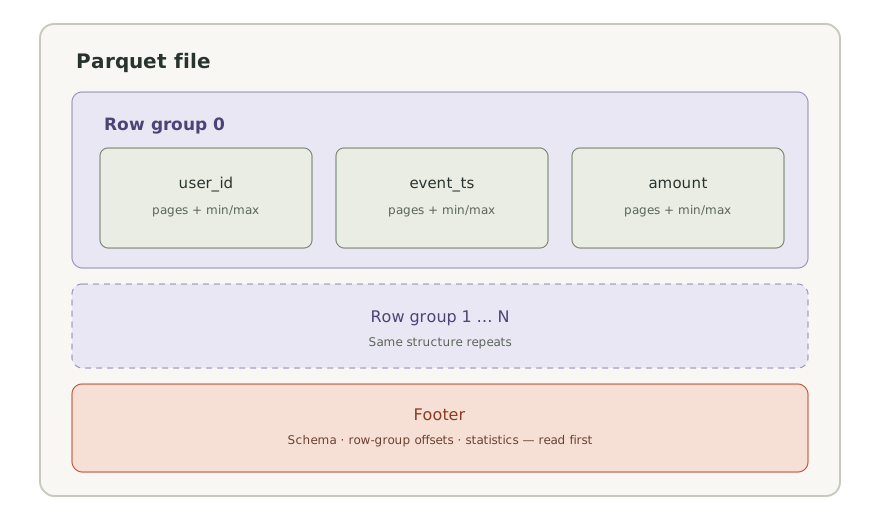
A Parquet file is a hierarchy, and that hierarchy explains nearly every tuning lever you have. The file is sliced horizontally into row groups; inside each row group, every column contributes a column chunk; each chunk is split into pages — the smallest unit of encoding, compression, and statistics.
The footer is the index: the schema, the byte offset of every column chunk, and per-chunk statistics such as minimum and maximum values. It is written after the data to allow single-pass writing, which is exactly why a reader starts at the end of the file — magic bytes, footer length, footer — and then reads only the chunks and pages it needs.
It is also why Parquet files are write-once: you never append a row group in place; new data becomes new files. Inside a page, values are encoded before compression. Dictionary encoding stores distinct values once and encodes rows as indexes — ideal for repetitive columns, but it falls back to plain encoding when the dictionary outgrows its budget, which is why a unique-ID column inflates file size. Optional bloom filters answer equality predicates on high-cardinality columns where min/max statistics cannot help.
Check the sources: Parquet file format · Parquet: encodings
Reading less: pruning, sizes, and small files
A well-planned scan avoids data in four different ways, and each happens in a different place.
- Partition pruning happens during directory listing, before any file is opened — directory names encode the values.
- File and row-group skipping uses footer statistics: a predicate range that cannot intersect a chunk's min/max drops it entirely.
- Column pruning uses chunk offsets: unreferenced columns are never read.
- Predicate pushdown passes supported filters into the reader, so pages that cannot match can be skipped while decoding.
Structure matters more than flags: statistics cannot skip row groups if the data is unordered — every group's min/max spans the whole domain. Writing sorted or clustered data is what makes skipping work.
File count is the other lever. Spark packs file-scan input into partitions up to spark.sql.files.maxPartitionBytes (128 MiB default) and sizes post-shuffle partitions from AQE's advisory size; thousands of tiny files defeat both. Spark still packs small files into scan partitions, but charges each one spark.sql.files.openCostInBytes (4 MiB by default), so per-file opens, footer reads, and listing cost dominate, and each file's statistics are too small to skip anything. Rewriting the layout is the real fix.
Compression codecs — snappy (fast, the Spark default for Parquet), zstd (smaller, still fast), gzip (small but slow) — matter less than page independence: because Parquet compresses each page on its own, the container stays splittable regardless of codec. "A gzip file cannot be split" is a property of a raw gzip stream, not of gzip-compressed Parquet.
Check the sources: Spark: Parquet files and options · Spark: file partition sizing
Schema evolution, and what a table format adds
Parquet resolves columns by name. Adding a column is safe — older files simply read as null for it — but renaming or dropping one is not, because old files still carry the old name. Type changes are safe only when they widen (int to long, float to double, higher decimal precision). Reading a directory whose files disagree on schema requires merging schemas across every footer (mergeSchema), which is off by default and can dominate startup on large tables.
None of this provides transactions, safe concurrent writers, or time travel: plain Parquet files on object storage have no commit protocol. That is the job of a table format. Delta Lake, Apache Iceberg, and Apache Hudi layer a transaction log or metadata tree over the same Parquet files, defining which files are part of the table at each version. Iceberg replaces table metadata files with atomic swaps and tracks snapshots through manifest lists; Delta commits ordered log entries that add and remove files. Spark reads them through their own connectors — these projects are independent of the Spark 3.5.7 baseline, and their guarantees come from their own documentation.
Check the sources: Spark: schema merging · Iceberg table spec · Delta Lake documentation
Try it on a small dataset
Run this in a PySpark notebook with an existing spark session. Create a local session if needed. Examples are illustrative; this website does not execute Spark.
from pyspark.sql import functions as F

events = spark.read.parquet("events")  # user_id, event_ts, amount, day

recent = (
    events
    .filter(F.col("day") == "2026-09-01")   # partition column: prunes directories
    .filter(F.col("amount") > 0)            # pushed into the Parquet reader
    .select("user_id", "amount")            # only these column chunks are read
)

recent.explain("formatted")The formatted plan shows PartitionFilters for day and PushedFilters for amount, and the scan lists only the columns the query needs. How much is actually skipped depends on how the data is ordered and how the row groups are sized — that is what the statistics measure, so read the scan metrics rather than assuming a number.
Result reasoned through on the small input; not runtime-tested against a Spark cluster.
Treating Parquet as "just a smaller CSV". The format pays off only when scans can skip: an unpushable predicate, unordered data that defeats min/max statistics, or thousands of tiny files can leave a Parquet table as slow as the CSV it replaced.
A query filters on a column and still reads every row group. What do you check?
Say your answer out loud before opening the notes.
Reveal the reasoning
Three things, in order. First, is the predicate pushable — a Python UDF, an unsupported expression, or a cast on the filtered column can block pushdown. Second, are the statistics useful — with unordered data every row group's min/max spans the whole domain, so nothing can be skipped; the fix is writing sorted or clustered data. Third, is it the partition column — only directory-level pruning avoids opening files at all. For equality filters on high-cardinality columns, bloom filters are the lever. All of these are write-time or layout decisions, not cluster-size decisions.
Sources & verification
Core claims checked against Apache Spark 3.5.7 documentation and source references on 2026-09-14. Explanations, scenarios, and diagrams are original teaching material. Other releases and managed runtimes can differ.
- Apache Parquet file format: layout, metadata, and single-pass writing ↗
- Apache Parquet: data page encodings ↗
- Spark 3.5.7: Parquet files, options, and configuration ↗
- Spark 3.5.7: ORC files and vectorized reader ↗
- Spark 3.5.7: Avro files, to_avro and from_avro ↗
- Spark 3.5.7 SQL tuning: file partitioning and AQE sizes ↗
- Apache Iceberg table spec: snapshots and optimistic concurrency ↗
- Delta Lake documentation: ACID transactions and transaction log ↗