The complete Spark execution flow
From spark-submit to the final result: explain who does what, when, and why.
Tell two connected stories: how the application gets compute, and how a query turns a plan into work on that compute.
Can you explain the full Spark flow, from application startup to the final result?
Six phases. Follow the responsibility.
Explore one phase at a time, then read the numbered steps below. This is a conceptual guide; planning can be demanded by an action or by plan inspection.
Submit & initialize
Submission determines driver placement. Driver-side code creates or reuses the classic session and context.
- Who owns it
- Driver-side program
- What changes
- Application context
- Where is the data?
- Source data remains in storage. Startup is not a scan of the whole dataset.
- How to verify it
- Check deploy mode and the application identity; an attached notebook may already be initialized.
Acquire executors
Resource allocation launches executor processes; executors register with the driver and become available for scheduling.
- Who owns it
- Cluster integration + executors
- What changes
- Available compute
- Where is the data?
- Data is still at its source. Adding compute does not imply all data is loaded into executor memory.
- How to verify it
- Check the Executors tab and resource requests. Dynamic allocation means executor count can change.
Describe & plan
Expressions describe the query. Analysis resolves references; optimization and physical planning are demanded when needed, including by plan inspection or an action.
- Who owns it
- Driver · Spark SQL
- What changes
- Logical → physical representations
- Where is the data?
- Metadata or schema work can occur. Planning and full result computation are distinct.
- How to verify it
- Compare analyzed, optimized, and physical plans with explain("extended"). This step is conceptual, not a claim that planning is eager.
Request & schedule
An action requests a result. DAG scheduling creates stage task sets; task scheduling assigns attempts to available executor resources.
- Who owns it
- DAG scheduler → task scheduler → backend
- What changes
- Jobs → stages → task attempts
- Where is the data?
- Tasks are ready to read or reuse the inputs they need. The cluster manager does not relay every task.
- How to verify it
- Follow the SQL execution to its jobs and stage tasks. Partition count is not the count of concurrent task slots.
Execute & exchange
Tasks process partitions and produce shuffle output when the physical plan requires it. Downstream work fetches and combines it; AQE can adapt using runtime statistics.
- Who owns it
- Executor tasks · adaptive planning on driver
- What changes
- Operators, partial results, shuffle blocks
- Where is the data?
- Data travels through executor operators and, for a shuffle, local or remote blocks. Different keys can share a hash partition.
- How to verify it
- Inspect shuffle read/write, spills, task sizes, and the final adaptive plan. A broadcast exchange is a different operation.
Complete or recover
Task status and metrics are tracked throughout execution. Recoverable failures can be retried; successful work returns results or commits output.
- Who owns it
- Executors + driver
- What changes
- Output, status, or retry
- Where is the data?
- Display/collect results reach the driver. File output is normally written from executors; the driver coordinates completion.
- How to verify it
- Check completion and sink output. A finished query does not necessarily end the application.
An application can repeat query execution. Executor allocation, metrics, and failure recovery can also occur while work is running.
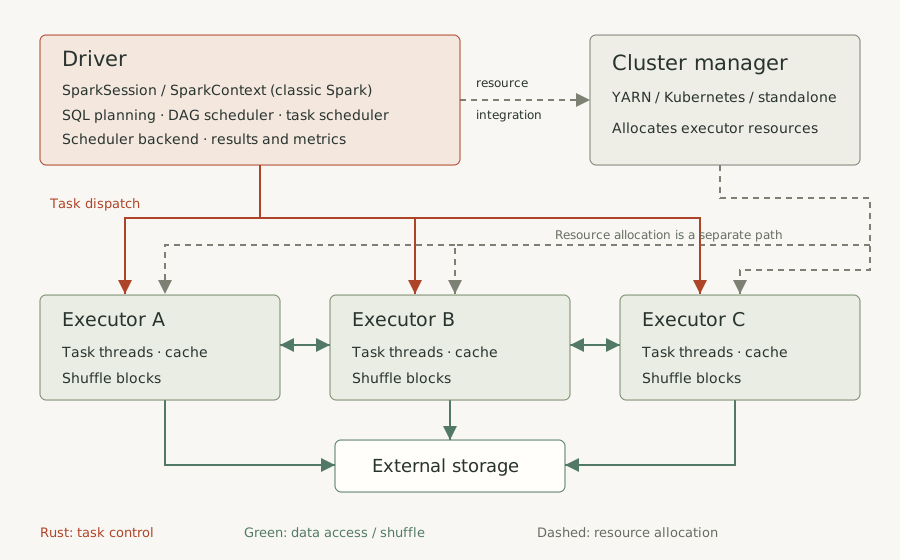
Before you draw the flow
Open with a scope statement: “I’ll describe a classic PySpark batch application using DataFrames on Spark 3.5.7.” Then separate the application’s lifetime from the execution of an individual query. One application can run many queries and jobs.
This matters in interviews: a notebook may already have a session and compute attached. With Spark Connect, a client sends plans to a remote server; the Python client is not the classic driver described below. Structured Streaming adds a continuously running query and its own execution lifecycle.
Learn the fundamentals first if the terms are new. This is the capstone that connects them.
Check the source: Spark Connect has a separate client/server architecture · Application components and resource allocation
1–4 · Start the application
- Submit the program. A command such as
spark-submit app.pylaunches the application using its master and deployment configuration. In client mode the driver runs on the submitting side; in cluster mode the cluster infrastructure launches it. The deployment mode determines driver placement. - Initialize or reuse the session. Driver-side code obtains a
SparkSession. In classic Spark, it uses aSparkContextfor the application’s connection and scheduling machinery.getOrCreate()may return an existing session; it is not a command that always launches a fresh driver. - Acquire executor resources. Cluster-manager-specific integration requests resources. YARN, Kubernetes, and Spark standalone are common choices; Mesos is deprecated in this reference release. Executors are processes, not synonyms for worker machines. Memory requests also have overhead beyond the configured executor heap.
- Register and become schedulable. Executors connect back to the driver. Resource availability and readiness settings affect when scheduling begins. There is no universal rule that every requested executor must exist before work can start. Dynamic allocation can add or remove executors later.
In local mode, task threads run locally; there is no remote cluster-manager allocation of three separate executors. In an already attached notebook, much of this startup may have happened before your cell ran.
Check the source: Driver placement and spark-submit · SparkSession.getOrCreate: create or reuse · Application components and resource allocation · Scheduling and dynamic resource allocation · Task CPUs, registration readiness, and retry configuration
5–8 · Describe the query and plan it
- Run the driver-side program. Python control flow executes normally. Reading a table and building expressions such as
filterandgroupBydescribe a distributed computation. Metadata discovery, schema inference, and analysis can already do work or report errors. - Analyze the logical plan. Spark SQL resolves references to columns, relations, functions, and types. “Aggregate over a filter over an input relation” describes the requested result. A logical input relation is not yet a physical
FileScanoperator. - Optimize the logical plan. Applicable rules simplify expressions and reduce unnecessary work. Column pruning and eligible filter pushdown are useful examples. Pushdown depends on the source and predicate; a remaining filter may still need to run. Join reordering and strategy choices have eligibility, statistics, and configuration requirements.
- Choose and prepare physical operators. The physical plan specifies how to compute the result: scans, filters, partial/final aggregates, joins, and exchanges. Eligible operators can be fused into generated code. That fusion is distinct from a scheduler stage.
These are conceptual planning phases, not an eager timeline for every transformation. Query execution holds lazily evaluated planning results; an action or plan inspection can demand them. explain("extended") lets you inspect the representations before requesting result rows.
Catalyst plans structured queries. The DAG scheduler later works with execution dependencies; it does not schedule the Catalyst logical tree directly. Ordinary RDD transformations do not go through the same DataFrame/SQL optimization pipeline.
Check the source: QueryExecution: analysis, optimization, physical planning · Reading EXPLAIN output · Physical strategy selection and join eligibility
9–11 · Request results and schedule work
- Call an action.
show(),count(),collect(), or an actual write operation asks for an outcome. Accessingdf.writealone only creates a writer. Necessary planning is completed and execution work is submitted. One user action can lead to multiple scheduler jobs; query execution and job are different levels. - Build the stage dependencies and tasks. The DAG scheduler identifies shuffle dependencies and available intermediate results. For a runnable stage attempt, it creates the required tasks and submits them as a
TaskSet. AShuffleMapStageproduces shuffle output; aResultStageproduces the result requested by that job. - Place task attempts on executors. The task scheduler uses resource offers, locality preferences, scheduling policy, and task resource requirements. The scheduler backend dispatches the selected work to executors. The cluster manager supplies resources; it is not an obligatory relay for each task or each data row.
Say “one task per partition to compute in that stage attempt”, not “one task per original file.” Some actions need only a subset of partitions. Retries and speculation create additional attempts, and downstream partition counts can change.
| Task CPU request | Available task slots | 16 ready tasks need at least |
|---|---|---|
spark.task.cpus = 1 | 3 × floor(4 / 1) = 12 | 2 waves |
spark.task.cpus = 2 | 3 × floor(4 / 2) = 6 | 3 waves |
This is a capacity model, not a timing promise. Other resources, competing jobs, skew, and task durations matter. Tasks run on executor threads; Spark does not permanently pin a partition to a physical CPU core.
Check the source: Actions, lazy transformations, and recomputation · DAGScheduler: stages, tasks, TaskSets, and recovery · TaskSchedulerImpl: task placement and resource offers · Task CPUs, registration readiness, and retry configuration
12–14 · Process partitions and shuffle
- Execute the task’s computation. An executor deserializes task information and processes the assigned execution partition. Pipelined operators can read, filter, project, and partly aggregate within one task. Built-in SQL expressions run through Spark’s execution engine; Python UDFs can involve Python worker processes.
- Produce and fetch shuffle blocks when required. For a grouped sum, map-side tasks may first produce partial sums. A shuffle exchange distributes these by key. The same key must reach compatible downstream grouping, but multiple distinct keys can share a hash partition. Downstream tasks fetch the required blocks, locally or remotely.
- Run downstream operators; adapt when applicable. Once dependencies are available, downstream tasks complete the aggregation. With AQE enabled, materialized exchange statistics can inform changes such as coalescing shuffle partitions or selecting a different supported join strategy. Initial and final plans can differ.
Shuffle can involve serialization, disk I/O, network I/O, and spill. A network transfer is not required for every block. BroadcastExchange instead prepares and distributes a broadcast relation; treating every operator containing “Exchange” as a shuffle is inaccurate.
Locality tries to avoid avoidable movement. PROCESS_LOCAL, NODE_LOCAL, RACK_LOCAL, and ANY describe locality choices; NO_PREF means there is no locality preference. Object-storage reads do not imply that an executor lives beside an HDFS block.
Check the source: Shuffle dependencies and output partitioning · BroadcastExchange is a different exchange · Adaptive query execution and shuffle partition coalescing · Data locality and its trade-offs
An AQE query stage is a physical-plan unit around an exchange; a whole-stage codegen region is an operator-fusion unit. Neither is interchangeable with a DAG scheduler stage in the Jobs/Stages UI. See the AQE query-stage implementation.
15–17 · Observe, recover, and finish
- Track progress throughout execution. Task status updates and metrics feed the driver’s view of the application. Use the SQL tab for query plans and linked jobs; use stage/task views for skew, shuffle, spill, duration, and GC evidence. The Storage tab concerns materialized persisted data.
- Recover eligible failures. A failed task attempt may be retried within configured limits. Lost shuffle output can require recomputation of earlier work. Recovery needs available inputs and recomputable logic; a deterministic code error will not be repaired by simply retrying it. Driver failure is a different lifecycle problem, not a task retry.
- Return or commit the output.
show()brings back enough rows to display, although computing those rows can require substantial upstream work.collect()returns all result rows to the driver. Distributed file writes normally write data from executors and coordinate commits; output data need not pass through the driver. One executor does not imply one output file. The application can accept another action, or terminate and release resources.
Do not claim that external side effects happen exactly once merely because Spark retries tasks. Side-effect safety and a sink’s commit guarantees need their own design. Do not stop a shared notebook session just because one query has finished.
Check the source: SQL, Jobs, Stages, Executors, and Storage tabs · DAGScheduler: stages, tasks, TaskSets, and recovery · Actions, lazy transformations, and recomputation
Trace the example before running it
The runnable example below creates 12 rows in four input partitions. Each ID determines a country and an amount. Filtering amount > 100 keeps IDs 3–11. Here is the input-side arithmetic:
| Partition | Input IDs | After the filter |
|---|---|---|
| P0 | 0, 1, 2 | No surviving rows |
| P1 | 3, 4, 5 | India 150 · USA 200 · UK 250 |
| P2 | 6, 7, 8 | India 300 · USA 350 · UK 400 |
| P3 | 9, 10, 11 | India 450 · USA 500 · UK 550 |
In a typical full-input execution, each input partition needs a task, even P0: Spark must evaluate its rows before knowing none survive. Partial sums can be shuffled and merged to produce India 900, USA 1050, UK 1200. The output order is unspecified.
Range (4 input partitions)
  → Filter amount > 100
  → Partial aggregate by country
  → Shuffle exchange by country
  → Final aggregate
  → Display a small result
This sketches the aggregation’s shuffle boundary, not an assertion that show() must produce exactly one job and two stages. AQE and result retrieval influence the observed scheduler work. spark.sql.shuffle.partitions does not define the four input partitions in this example.
For your Parquet version, replace the generated input with spark.read.parquet("/orders"). Inspect the actual scan and partitioning instead of assuming one input file means one task. Look for pushed filters and selected columns; do not expect a literal operator-for-operator match with this range example.
Check the source: Reading EXPLAIN output · Shuffle dependencies and output partitioning · Adaptive query execution and shuffle partition coalescing
A repeatable way to answer in an interview
- Scope it. State classic PySpark or Spark Connect, batch or streaming, and whether the application is already running.
- Draw the roles. Put the driver beside the cluster manager and executors. Show resource allocation separately from task dispatch and data access.
- Walk the query. Use one scan → filter → grouped sum → action example. Identify what is a plan and what actually processes data.
- Explain the expensive boundary. Draw the partial aggregate, shuffle write/read, and final aggregate. Say what crosses the boundary.
- Size the work with assumptions. Separate input partitions, shuffle partitions, task attempts, and concurrent slots. Then discuss skew and retries.
- Verify the story. Name the plan operator or Spark UI evidence you would inspect. Finish with where the result goes and whether the application stays alive.
Practice at two depths: give the answer below in roughly 90 seconds, then walk through the example when the interviewer asks for detail. Avoid reciting 17 steps without explaining who owns each step.
Check the source: SQL, Jobs, Stages, Executors, and Storage tabs
Corrections to the supplied explanation
The supplied answer is a useful starting outline. These changes make it safer to use as an interview explanation:
| Shortcut in the draft | More accurate explanation |
|---|---|
| Session/context → driver starts | The driver-side program creates or reuses the classic session/context. Driver placement comes from deployment mode; attached notebooks may already have it. |
| Nothing runs until an action | Result computation is generally lazy. Python code, metadata work, and analysis can run earlier; plan inspection can demand planning. |
| Every transformation produces a physical plan immediately | Logical expressions are composed; analysis, optimization, and physical planning are requested as needed. |
| Task scheduler creates the tasks | DAG scheduling creates the tasks and TaskSet for a stage attempt. Task scheduling places and manages task attempts. |
| One action → one job | A useful first approximation, not a count guarantee. SQL actions can involve multiple jobs. |
| Exchange → shuffle | Distinguish shuffle exchanges from broadcast exchanges. |
| join is always wide; withColumn is always narrow | Inspect required physical distribution. Broadcast joins can avoid shuffling the large side; a window expression introduced with withColumn can require redistribution. |
| Core → one task | Task slots depend on CPU/resource requests and available resources. The default CPU request is one; it is configurable. |
| Each distinct key gets its own partition | Hash partitioning places the same key compatibly, but different keys may share a partition. |
| The selected physical plan never changes | AQE can revise parts of the plan using runtime statistics. |
Keep the relationships, but say them precisely: action requests results; shuffle dependencies separate scheduler stages; tasks compute stage partitions; resource slots bound concurrency; executors run task attempts.
Check the source: SparkSession.getOrCreate: create or reuse · QueryExecution: analysis, optimization, physical planning · DAGScheduler: stages, tasks, TaskSets, and recovery · TaskSchedulerImpl: task placement and resource offers · BroadcastExchange is a different exchange · Physical strategy selection and join eligibility · Task CPUs, registration readiness, and retry configuration · Adaptive query execution and shuffle partition coalescing
Further checks: Window distribution requirements · Incremental result retrieval
Try it on a small dataset
Run this in a PySpark notebook with an existing spark session. Create a local session if needed. Examples are illustrative; this website does not execute Spark.
from pyspark.sql import functions as F

# Uses an existing classic SparkSession named spark.
orders = (
    spark.range(0, 12, 1, 4)
    .withColumn("country",
        F.when(F.col("id") % 3 == 0, "India")
         .when(F.col("id") % 3 == 1, "USA")
         .otherwise("UK"))
    .withColumn("amount", F.col("id") * 50)
)
result = (
    orders.filter(F.col("amount") > 100)
    .groupBy("country")
    .agg(F.sum("amount").alias("total"))
)

result.explain("extended")  # inspect plans, not result rows
result.show(truncate=False) # request the result
India: 900 · USA: 1050 · UK: 1200. Row order is unspecified. Actual job/stage counts must be observed in the Spark UI.
Result reasoned through on the small input; not runtime-tested against a Spark cluster.
The physical plan, scheduler-stage graph, and task-attempt timeline are different views. Do not infer exact job counts from source lines, or exact concurrency from partition counts.
Can you explain the full Spark flow, from application startup to the final result?
Say your answer out loud before opening the notes.
Reveal the reasoning
For a classic PySpark batch application, submission and deploy mode determine where the driver runs. Driver-side code creates or reuses a SparkSession and SparkContext, and cluster integration obtains executors that register with the driver. DataFrame operations describe a logical query; Spark SQL analyzes it and, when needed, optimizes and plans physical execution. An action requests results and can trigger multiple jobs. The DAG scheduler separates execution dependencies at shuffle boundaries and creates tasks for runnable stage partitions. The task scheduler places task attempts on available executor resources through its backend. Executors run operators, may partly aggregate, and exchange data when the plan requires it. AQE can adjust downstream execution using runtime statistics. Status and metrics return to the driver, recoverable failures can be retried, and the output is returned to the driver or written to storage. The application can then run more work or shut down.
Sources & verification
Core claims checked against Apache Spark 3.5.7 · classic PySpark batch documentation and source references on 2026-09-14. Explanations, scenarios, and diagrams are original teaching material. Other releases and managed runtimes can differ.
- Driver placement and spark-submit ↗
- SparkSession.getOrCreate: create or reuse ↗
- Application components and resource allocation ↗
- Spark Connect has a separate client/server architecture ↗
- QueryExecution: analysis, optimization, physical planning ↗
- Reading EXPLAIN output ↗
- Physical strategy selection and join eligibility ↗
- DAGScheduler: stages, tasks, TaskSets, and recovery ↗
- TaskSchedulerImpl: task placement and resource offers ↗
- Task CPUs, registration readiness, and retry configuration ↗
- Scheduling and dynamic resource allocation ↗
- Data locality and its trade-offs ↗
- Shuffle dependencies and output partitioning ↗
- BroadcastExchange is a different exchange ↗
- Adaptive query execution and shuffle partition coalescing ↗
- Actions, lazy transformations, and recomputation ↗
- SQL, Jobs, Stages, Executors, and Storage tabs ↗
- Window expressions have distribution requirements ↗
- SparkPlan result retrieval and incremental take ↗
- AQE query stages are physical-plan units ↗